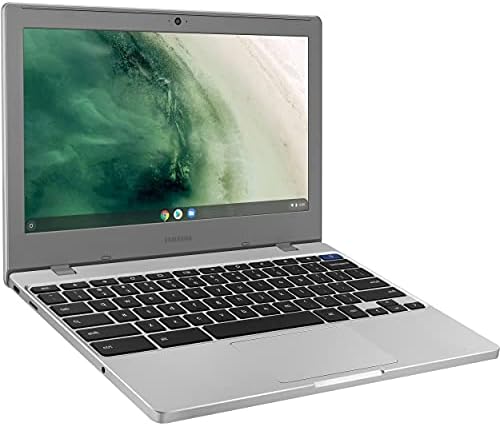
Samsung Chromebook 4 Chrome OS 11.6-inch HD Intel Celeron Processor N4000 4GB RAM 32GB eMMC Gigabit Wi-Fi – XE310XBA-K01US (Renewed)

In the market for a straightforward, no-fuss laptop for basic computing tasks? The Samsung Chromebook 4, particularly in its renewed form, presents a compelling value proposition. This analysis provides a detailed, specification-based breakdown of the Samsung Chromebook 4 (model XE310XBA-K01US) to help you determine if its hardware profile aligns with your needs. As a renewed product, it offers the core specifications of a capable entry-level Chromebook, emphasizing portability and simplicity. We will examine its confirmed components, realistic performance expectations, ideal use cases, and key factors to consider before making a purchase decision.
Quick Specifications
| Component | Specification |
|---|---|
| CPU | Intel Celeron Processor N4000 (Dual-Core) |
| GPU | Intel UHD Graphics 600 (Integrated) |
| RAM | 4GB |
| Storage | 32GB eMMC |
| Display | 11.6-inch HD (1366 x 768) |
| Operating System | Chrome OS |
| Wireless | Gigabit Wi-Fi |
| Model Number | XE310XBA-K01US |
| Condition | Renewed |
Key Features of the Samsung Chromebook 4
The Samsung Chromebook 4 is built around a philosophy of essential, cloud-centric computing. Its feature set is tailored for users whose primary activities reside within a web browser. The inclusion of Gigabit Wi-Fi is a notable highlight for a device in this class, supporting faster network connectivity for streaming and web applications. The 11.6-inch form factor is inherently portable, and the Chrome OS platform is designed for swift boot times and automatic updates. As a renewed product, it undergoes a professional inspection and cleaning process to ensure basic functionality, offering a cost-effective path to this specific hardware configuration.
Design and Build Considerations
Based on its specifications and product category, the Samsung Chromebook 4 is positioned as a lightweight and portable device. The 11.6-inch display size suggests a compact chassis that is easy to carry in a backpack. The use of an Intel Celeron N4000 processor and eMMC storage typically allows for a fanless or very quiet thermal design, contributing to silent operation. The build materials are expected to prioritize durability and weight savings suitable for student use or frequent travel. The HD resolution display provides adequate clarity for reading text and watching videos, though it is not a high-density panel.
Realistic Performance Expectations
Performance for the Samsung Chromebook 4 must be evaluated within the context of Chrome OS and its hardware. The Intel Celeron N4000 processor with 4GB of RAM is configured for fundamental tasks. This combination is appropriate for users who need fast application responsiveness within the Chrome browser ecosystem. You can expect smooth performance for web browsing with multiple tabs, using web-based applications like Google Docs and Sheets, streaming HD video from services like YouTube or Netflix, and running Android apps from the Google Play Store that are not graphically intensive. It is not designed for demanding workloads such as video editing, high-end gaming, or running traditional desktop software like Adobe Photoshop or Windows applications. The 32GB of eMMC storage is primarily for the operating system, essential apps, and cached files, with the expectation that most user data will be stored in the cloud via Google Drive or similar services.
Pros and Cons
Understanding the trade-offs is crucial for any purchase. Here is a balanced look at the advantages and limitations based on the confirmed specifications.

Disclosure: This review may contain affiliate links. As an Amazon Associate, I earn from qualifying purchases—at no extra cost to you.
Pros
- Strong Value Proposition: As a renewed device, it offers access to capable Chromebook hardware at a reduced cost.
- Highly Portable: The 11.6-inch form factor is lightweight and easy to transport.
- Efficient Operation: The hardware platform is designed for good battery life and typically quiet, fanless operation.
- Simple and Secure: Chrome OS is known for its ease of use, fast boot times, and built-in security features.
- Gigabit Wi-Fi Support: Enhances web browsing and streaming performance on fast networks.
Cons
- Limited Local Storage: 32GB fills quickly if you intend to store large media files or many Android apps offline.
- Basic Performance Ceiling: The Celeron N4000 and 4GB RAM define a clear boundary for multitasking and application complexity.
- Display Resolution: The HD (1366×768) resolution is standard for the category but less sharp than Full HD panels.
- Renewed Product Considerations: Requires trust in the renewal process; cosmetic condition may vary.
Comparison with Similar Products
When considering the renewed Samsung Chromebook 4, it’s helpful to contextualize it against common alternatives. Compared to new entry-level Chromebooks with similar specs, the primary advantage is cost savings. Compared to used laptops in the same price range, this Chromebook offers a predictable, clean software experience with automatic updates. Versus tablets with keyboards, it provides a more traditional laptop form factor with a trackpad and full Chrome browser. This product makes the most sense for buyers who have confirmed that their workflow is entirely compatible with Chrome OS and who prioritize budget and portability above raw computing power or local storage capacity. If your needs include running specific Windows or macOS software, require more than 32GB of local storage, or involve heavier multitasking, a device with different specifications would be a more suitable match.
Buying Guide: Is This Chromebook Right For You?
This buying guide is designed to align the device’s capabilities with potential user profiles.
This Samsung Chromebook 4 is an excellent fit for:
- Students: Ideal for research, writing papers in Google Docs, attending online classes, and basic educational apps.
- Secondary Device Users: Perfect as a portable companion for checking email, browsing, and media consumption away from a primary computer.
- Light Home Users: Suitable for managing finances, online shopping, social media, and streaming video in a compact form.
- Travelers: Its portability and reliance on cloud storage make it a good candidate for trips.
You should consider other options if you:
- Require specific desktop applications (e.g., full Microsoft Office, Adobe Creative Suite, specialized business software).
- Frequently work offline with large files or extensive media libraries.
- Need to heavily multitask with dozens of browser tabs while running Android apps simultaneously.
- Prefer a larger screen or higher-resolution display for extended work sessions.
Key Things to Verify Before Buying
As an informed buyer, especially for a renewed product, you should always confirm the following details directly on the Amazon product listing at the time of purchase:
- Final Specifications: Verify the exact CPU, RAM, storage, and display specs match this analysis (XE310XBA-K01US).
- Renewed Condition Details: Check the seller’s description for what “Renewed” entails—cosmetic grading, battery health indicators, and included accessories.
- Warranty and Return Policy: Confirm the duration and terms of the warranty provided by the renewing seller.
- Included Accessories: Ensure the listing specifies what is included, typically a charger, but this can vary.
- Connectivity Ports: Review the product images or description to confirm the types and number of USB ports, video outputs, and headphone jack.

Frequently Asked Questions (FAQ)
Can I install Microsoft Office on this Chromebook?
You cannot install the traditional desktop version of Microsoft Office. However, you can use the web-based version of Microsoft 365 (Office.com) through the Chrome browser, or install the Android versions of Word, Excel, and PowerPoint from the Google Play Store, which offer core functionality.
How long will this Chromebook receive software updates?
Google provides Automatic Update Expiration (AUE) dates for each Chromebook model. The original Samsung Chromebook 4 has a defined AUE date. It is essential to search for the specific AUE date for model XE310XBA-K01US to understand until what year it will receive critical Chrome OS updates and security patches.
Is the storage expandable?
The internal 32GB eMMC storage is not user-upgradeable. However, you can expand storage easily using the device’s USB ports with a flash drive or a microSD card if the model includes a card reader, which is a common feature on Chromebooks. Always verify port availability on the specific listing.
What does “Renewed” mean for this product?
“Renewed” typically means the product has been professionally
Disclosure: This review may contain affiliate links. As an Amazon Associate, I earn from qualifying purchases—at no extra cost to you.